

6 Desk Phones With Emergency Hotline for Small Offices
Last Updated: October 26, 2026
Quick Summary
Desk phones emergency hotline are pre-programmed phones that auto-dial 911 or another emergency number when the handset is lifted, providing reliable backup communication for small offices. HQ Telecom offers six models ranging from $69.99 to $119.95, all line-powered with no monthly fees, designed for accessibility and high-traffic environments.
- Industrial Desk Phone auto-dials any number up to 25 digits and works on analog lines, VoIP, or DTMF systems without batteries.
- Auto-Dialer Emergency Desk/Wall Phone mounts on desk or wall, offers hearing aid compatibility with four volume levels, and includes visual call alerts.
- Big Button Caller ID Phone features one-touch 911 dialing and supports up to 12 memory keys with photo labels for seniors and accessibility.
- Picture Dialer Phone Box supports ten one-touch memory keys with photo labels, ideal for assisted living and memory care settings.
- All models come with one-year warranty, 30-day return policy, and volume discounts up to 25% for orders of three or more.
Table of Contents
- Quick Comparison Table: Desk Phones With Emergency Hotline
- How We Evaluated the Best Desk Phones With Emergency Hotline
- 1. Industrial Desk Phone: Programmable Auto-Dial for Incoming Calls
- 2. Auto-Dialer Emergency Desk/Wall Phone: Dual-Mount Flexibility and Hearing Aid Compatibility
- 3. Industrial Wall Phone: Rugged Emergency Hotline With Visual Labels
- 4. Trim-Style Emergency Wall/Desk Phone: Compact Design With Pre-Programmed 911
- 5. Big Button Caller ID Phone: One-Touch Emergency Key for Seniors and Accessibility
- 6. Picture Dialer Phone Box: Multi-Contact Auto-Dial for Assisted Living and Care Settings
- Installing and Configuring Your Emergency Hotline Desk Phone
- Why Desk Phones With Emergency Hotline Matter for Small Offices
- Call Quality and Reliability: What to Expect
- Pricing and Total Cost of Ownership
- Accessibility and Usability Under Stress
- Frequently Asked Questions
Quick Comparison Table: Desk Phones With Emergency Hotline
| Phone Model | Price | Best For | Key Feature | Mount Options |
|---|---|---|---|---|
| Industrial Desk Phone | $99.99 | Incoming calls, auto-dial | Programmable hotline, works with VoIP | Desk only |
| Auto-Dialer Emergency Desk/Wall Phone | $119.95 | Dual-mount flexibility | Hearing aid compatible, adjustable ringer | Desk or wall |
| Industrial Wall Phone | $99.99 | Wall-mounted emergency access | Pre-labeled "EMERGENCY", rugged design | Wall only |
| Trim-Style Emergency Wall/Desk Phone | $99.00 | Compact spaces | Pre-programmed 911, compact size | Wall or desk |
| Big Button Caller ID Phone | $79.99 | Seniors, accessibility | One-touch 911 key, large display | Wall or desk |
| Picture Dialer Phone Box | $69.99 | Assisted living, care settings | Up to 10 picture-based one-touch dials | Desk only |
How We Evaluated the Best Desk Phones With Emergency Hotline
At HQ Telecom, we've spent 30 years engineering phones that work when it matters most. We evaluated each option on these criteria:
We evaluated each option based on these criteria:
- Emergency reliability: Does the phone work on standard analog lines or VoIP without requiring internet connectivity?
- Ease of programming: How straightforward is it to set up the hotline number and test it?
- Accessibility: Does the phone accommodate hearing aids, large buttons, or visual alerts?
- Mounting flexibility: Can it work on a desk, wall, or both?
- Compatibility: Does it integrate with existing phone systems without special configuration?
- Durability: Is it built to withstand heavy use in busy office environments?
Each phone below can be configured to auto-dial a pre-programmed number when the handset is lifted.
1. Industrial Desk Phone: Programmable Auto-Dial for Incoming Calls
The Industrial Desk Phone is built for hotels, pizza shops, barber shops, and any location where a phone is needed for receiving calls but outgoing dialing should be restricted.

When pre-programmed with any phone number up to 25 digits long, the phone automatically dials that number the moment someone lifts the handset.
How it works in practice: Program 911 (or any other number) once using any analog phone. The phone retains that programming indefinitely, even if disconnected from the phone line.
Works on any analog phone line, PSTN, VoIP, or DTMF-compatible systems.
Available in three colors: black, red, and ash/beige.
Best for: Businesses with high call volumes where outgoing calls should be controlled or eliminated entirely.
2. Auto-Dialer Emergency Desk/Wall Phone: Dual-Mount Flexibility and Hearing Aid Compatibility
The Auto-Dialer Emergency Desk/Wall Phone mounts on a desk or wall and auto-dials 911 or any other pre-programmed number.

The phone works behind any standard analog phone line (landline, VoIP, or registered PABX system). One caveat: it cannot be used with digital PABX station ports.
Dimensions are 8.75" long by 6.0" wide by 2.75" high. FCC Part 68, FCC Part 15, and UL 1459 certified. One-year warranty.
Best for: Small offices needing a flexible phone that works on both desk and wall, with built-in accessibility features for staff with hearing aids.
3. Industrial Wall Phone: Rugged Emergency Hotline With Visual Labels
The Industrial Wall Phone is purpose-built for high-traffic areas.

This model comes with a removable vinyl "EMERGENCY" label on the handset, so anyone in the space knows exactly what the phone is for.
The package includes a wallplate with an RJ11 socket, a coiled handset cord (approximately 10 feet), and programming instructions. Works on PSTN, VoIP, or any FSK or DTMF-compatible line.
Available in black, red, and ash/beige.
Best for: Emergency elevators, stairwells, or public areas where the phone's purpose needs to be immediately obvious.
4. Trim-Style Emergency Wall/Desk Phone: Compact Design With Pre-Programmed 911
The Trim-Style Emergency Wall/Desk Phone measures just 8" long by 3" wide by 4" deep, fitting corners, alcoves, or tight hallways where a larger phone won't work.
The built-in auto dialer comes pre-programmed to dial 911.
Red color. Weighs 14 oz. Works on any standard analog phone line. No batteries or AC power required.
Best for: Compact spaces, narrow hallways, or locations where you need a professional-grade emergency phone without taking up much wall real estate.
5. Big Button Caller ID Phone: One-Touch Emergency Key for Seniors and Accessibility
The Big Button Caller ID Phone is engineered for seniors and anyone who benefits from large buttons and simple operation.
The phone supports up to 12 one-touch memory keys.
Powered by the phone jack, no batteries or AC adapter needed. Wall-mountable. One-year warranty in parts and labor.
Best for: Seniors living independently, assisted living facilities, or any setting where ease of use and accessibility are paramount.
6. Picture Dialer Phone Box: Multi-Contact Auto-Dial for Assisted Living and Care Settings
The Picture Dialer Phone Box supports up to ten one-touch memory keys, each labelable with a photo, making it ideal for people with cognitive decline or those who struggle with traditional phone interfaces.
A simple switch toggles between normal and one-touch dialing.
Powered by the phone jack, no batteries or AC adapter. All memory settings are backed up for life using EEPROM technology.
Best for: Assisted living communities, memory care units, or home settings where simplified one-button calling to family members or emergency services is essential.
Installing and Configuring Your Emergency Hotline Desk Phone
Setup takes minutes. Most HQ Telecom emergency phones are line-powered and require no external equipment.
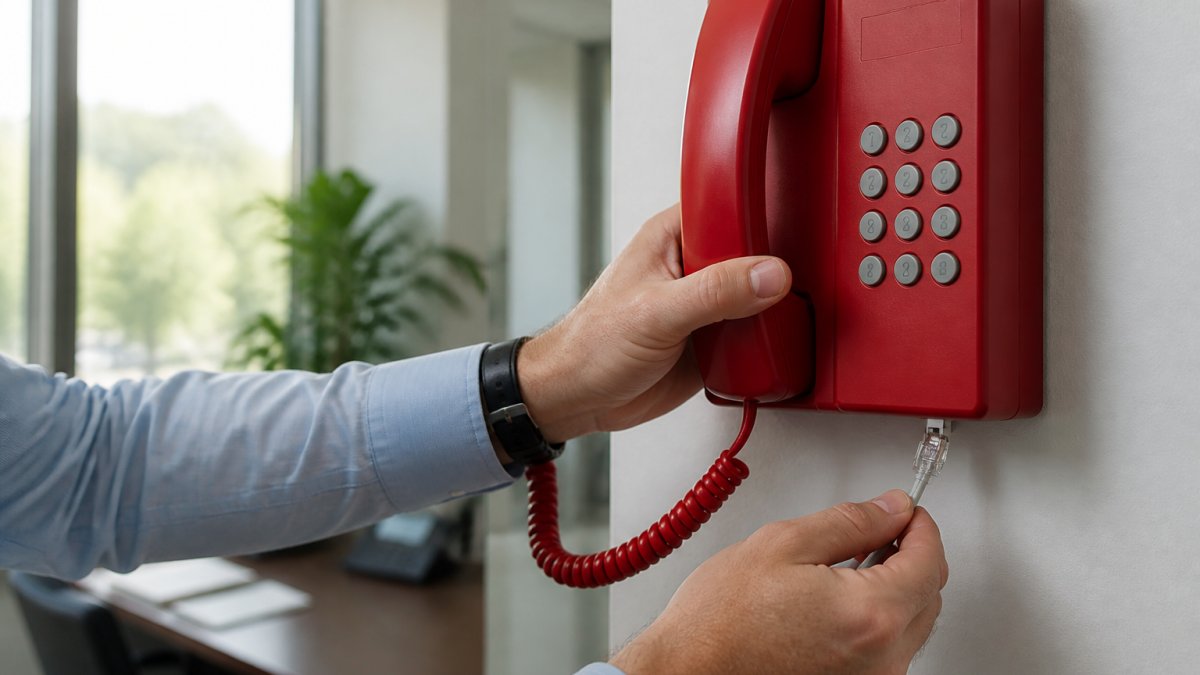
Basic installation steps:
- Mount the phone (wall or desk, depending on the model)
- Connect the phone line using the included RJ11 cord
- Connect the handset using the coiled cord
- Program the hotline number using any analog phone on the same line
To program the hotline number, pick up the handset, listen for the dial tone, dial the number you want to store (up to 25 digits), and press the memory button or follow the model-specific instructions.
Test the hotline immediately. Call the number from another phone to confirm the connection. If you programmed 911, call from your mobile phone to verify the line routes correctly to your local emergency services.
Watch out: VoIP lines may have limitations for accessing 911.
Why Desk Phones With Emergency Hotline Matter for Small Offices
Research from Berkeley Lab's workplace safety guidance shows that when someone is near their desk phone during an emergency, calling 911 from that phone is the best option because it allows on-site responders to locate the caller quickly.
Mobile phones, while portable, don't always provide location data to emergency dispatch. A dedicated desk phone with a pre-programmed emergency hotline removes the need to remember a number or navigate a phone's interface under stress.
For small offices under 15 people, a single emergency hotline desk phone in a central location (reception, break room, or stairwell) provides a reliable backup to mobile phones.
According to NENA's guidance on VoIP and 911 limitations, VoIP phones may have limitations for accessing 911 services.
Call Quality and Reliability: What to Expect
Desk phones with emergency hotlines deliver full-duplex audio, so both parties can speak and hear simultaneously without lag, which matters when every second counts.
Analog desk phones do not depend on internet bandwidth or cloud PBX systems. When your internet goes down, your emergency phone still works.
The reliability advantage is significant. According to research on mobile phone use in emergency situations, there is a statistical association between mobile-phone use to contact emergency services and life-threatening situations.
A desk phone's ringer is audible throughout a small office. A mobile phone ringing in someone's bag or pocket might be missed.
Pricing and Total Cost of Ownership
Emergency hotline desk phones from HQ Telecom range from $69.99 to $119.95 as a one-time purchase. Compare this to corded emergency phones in the broader market, which HQ Telecom's 2026 emergency phone guide lists at prices from $69.99 to $339.
At HQ Telecom, there are no monthly service fees, no cloud subscriptions, and no licensing costs. You buy the phone once and it works indefinitely on any analog phone line.
For a small office of 15 people, one or two emergency hotline phones cost under $250 total. They come with a 30-day return policy and one-year warranty, and volume discounts up to 25% are available for orders of three or more.
Ongoing costs are zero beyond your existing phone line service. The phones are line-powered and require no batteries or external equipment.
Accessibility and Usability Under Stress
The Big Button Caller ID Phone and Picture Dialer Phone Box are designed for users who may struggle with traditional phone interfaces.
For hearing-impaired users, several models include hearing aid compatibility, adjustable handset volume up to 40db, and visual ringer alerts.
Speakerphone capability matters for hands-free communication.
Choosing the right emergency hotline desk phone depends on your office layout, user needs, and budget.
HQ Telecom's 30-year track record in telecommunications means every phone is engineered for reliability when it matters most.
Frequently Asked Questions
What is an emergency hotline desk phone?
An emergency hotline desk phone is a specialized telephone with a built-in auto-dialer that automatically calls a pre-programmed number (usually 911) when the handset is lifted. These phones work on analog phone lines, VoIP systems, or registered PABX systems and are designed for situations where quick emergency contact is critical. They're commonly used in offices, elevators, medical facilities, and public spaces. The auto-dial function eliminates the need to remember or manually dial emergency numbers under stressful conditions.
How does a one-touch emergency button work on a desk phone with emergency hotline?
A one-touch emergency button triggers auto-dialing when the handset is taken off the hook or when a dedicated button is pressed. The phone is pre-programmed with a phone number (up to 25 digits, including pauses) during setup. When activated, the phone automatically dials that number without requiring any additional input. Some models, like the Big Button Caller ID Phone, feature large, clearly labeled buttons designed for quick access under stress. The number is retained in memory even if the phone is disconnected from the line.
Can a desk phone automatically call an emergency contact during a power outage?
Corded emergency hotline desk phones that are line-powered (drawing power from the phone line itself rather than requiring AC electricity) can function during a power outage, as long as the phone line remains active. Models like the Industrial Desk Phone and Industrial Wall Phone are telephone line powered and retain their programming even if disconnected. However, if your phone line relies on a router or modem that requires AC power, the system will fail during an outage. For guaranteed emergency backup, verify that your phone line infrastructure remains powered through a battery backup system or UPS.
Are emergency hotline desk phones suitable for small offices?
Yes, emergency hotline desk phones are ideal for small offices. They provide reliable emergency communication without requiring internet connectivity or complex setup. Models like the Auto-Dialer Emergency Desk/Wall Phone ($119.95) and Industrial Desk Phone ($99.99) work on standard analog lines or VoIP systems that are FSK or DTMF compatible. They're durable, require minimal maintenance, and offer one-touch dialing for quick emergency response. Many small offices use them as backup communication in case primary systems fail, ensuring staff can always reach help when needed.
How do I set up and test an emergency hotline on a desk phone?
Setup involves three steps: First, connect the phone to your phone line using the included cord and wall jack. Second, program the emergency number by following the do-it-yourself instructions provided with your phone (most models can be programmed using any analog phone). Third, test the connection by lifting the handset to verify the auto-dial function triggers correctly. Write down the programmed number and keep it visible for staff reference. Test the system monthly to ensure the number is still programmed and the line remains active. Many models include a manual for detailed programming steps specific to your phone type.
