

7 Best Picture Dialer Phones for Business Offices
Last Updated: November 14, 2026
Quick Summary
The best picture dialer phones for business offices combine photo or label slots on each memory key, one-touch dialing, and a wired connection. Options range from the $69.99 Picture Dialer Phone Box with ten one-touch keys to the $99.99 Industrial Desk Phone that auto-dials on handset lift.
- The Picture Dialer Phone Box stores ten numbers and draws power from the phone jack with no batteries.
- The Big Button Caller ID Phone offers twelve memories and a handset volume reaching 40db.
- The AT&T ML17929 provides an 18-number speed dial plus a 100-name phonebook across two lines.
- The Industrial Wall Phone No-Dial removes the keypad entirely and carries a two-year warranty.
- Analog picture dialer phones work on VoIP lines that support FSK or DTMF tone dialing.
Table of Contents
- Why Picture Dialer Phones Belong in Business Offices
- Quick Comparison: 7 Picture Dialer Phones at a Glance
- 1. Picture Dialer Phone Box: One-Button Dialing for Up to 10 Numbers
- 2. Big Button Caller ID Phone: A Picture Button Desk Phone for Shared Desks
- 3. Industrial Desk Phone: Hotline Reliability for Front Desks
- 4. AT&T ML17929 2-Line Corded Telephone: Speed Dial for Multi-Line Offices
- 5. Industrial Wall Phone: Picture Dialing Meets Wall-Mount Durability
- 6. Industrial Wall Phone No-Dial: Auto-Dial for High-Traffic Areas
- How Picture Buttons Work With VoIP, PBX, and Modern Systems
- Total Cost of Ownership Across Office Sizes
- Frequently Asked Questions
Why Picture Dialer Phones Belong in Business Offices
Picture dialer phones turn a desk phone into a visual speed-dial panel. Instead of memorizing extensions or hunting through a contact list, staff press a button with a photo next to it and the call connects. For offices where the same ten numbers get dialed all day, that single design choice removes friction from every call.
At HQ Telecom, we supply desk and wall-mount telephones built for repetitive dialing. The best picture dialer phones for business offices share three traits: a photo or label slot on each memory key, one-touch dialing, and a wired connection. Below, we break down seven models by use case, price, and the office type each one suits.
Picture buttons matter most where speed and accuracy overlap. A receptionist routing calls, a clinic front desk reaching a nurse station, a warehouse supervisor dialing the same supplier: all of them benefit when the correct number is a single press away. The phones in this guide range from a compact ten-number dialer box to industrial wall units built for corridors and loading bays.
Quick Comparison: 7 Picture Dialer Phones at a Glance
The table below summarizes every model by price, dialing style, and best-fit office.
| Model | Price | Dialing Style | Best For |
|---|---|---|---|
| Picture Dialer Phone Box | $69.99 | 10 one-touch picture keys | Busy individual desks |
| Big Button Caller ID Phone | $79.99 | 12 memories with photo slots | Shared and senior-friendly desks |
| Industrial Desk Phone | $99.99 | Auto-dial on handset lift | Front desks needing hotline |
| AT&T ML17929 2-Line | $79.99 | 18-number speed dial | Multi-line offices |
| Industrial Wall Phone | $69.00 | Keypad plus optional hotline | Hallways and workshops |
| Industrial Wall Phone No-Dial | $99.99 | Auto-dial, no keypad | High-traffic emergency points |
Price
A quick note on what this table cannot tell you: price is not the same as total cost. A cheaper desk phone that fails after a year of constant use costs more than a durable unit that lasts. We weight durability heavily in the sections below.
1. Picture Dialer Phone Box: One-Button Dialing for Up to 10 Numbers
The Picture Dialer Phone Box is the purest expression of the category: a compact desk unit with ten memory keys, each able to hold a photo or label for one-touch auto dialing. Press the toggle to switch between normal dialing and one-touch mode, and the phone becomes a dedicated speed-dial panel.
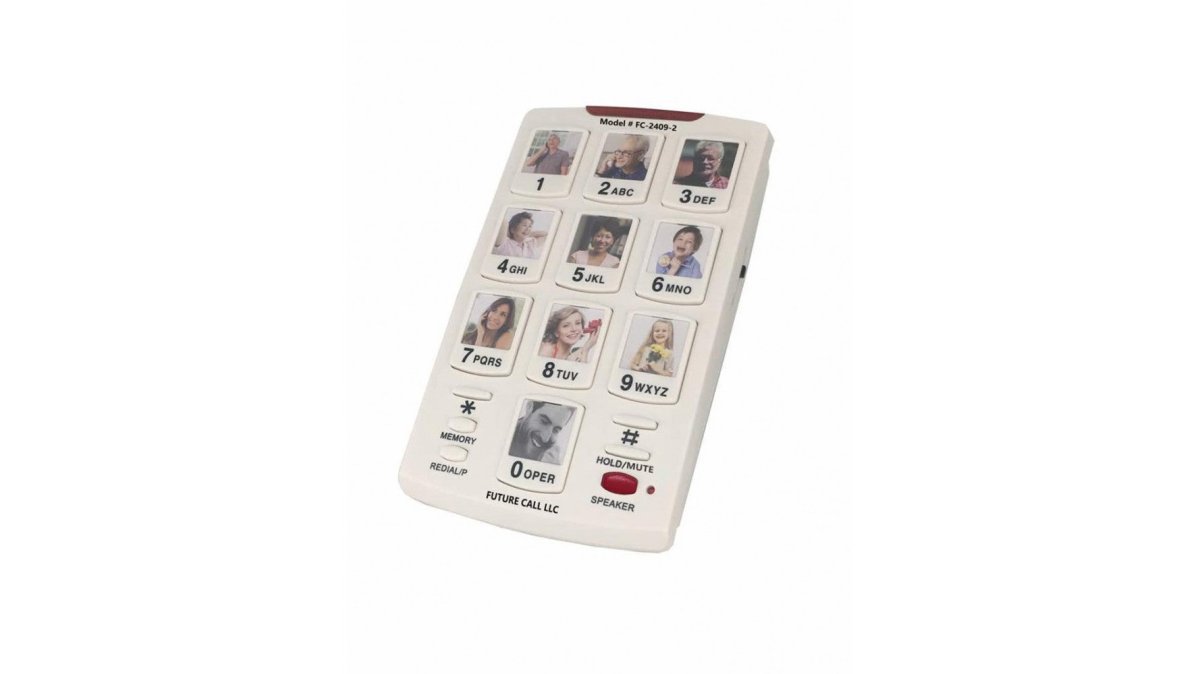
The speakerphone is hearing-aid friendly with volume control, the ringer has off, low, and high settings, and a bright LED signals an active line. It draws power from the phone jack, so there are no batteries or AC adapter required. All memories are backed up for life.
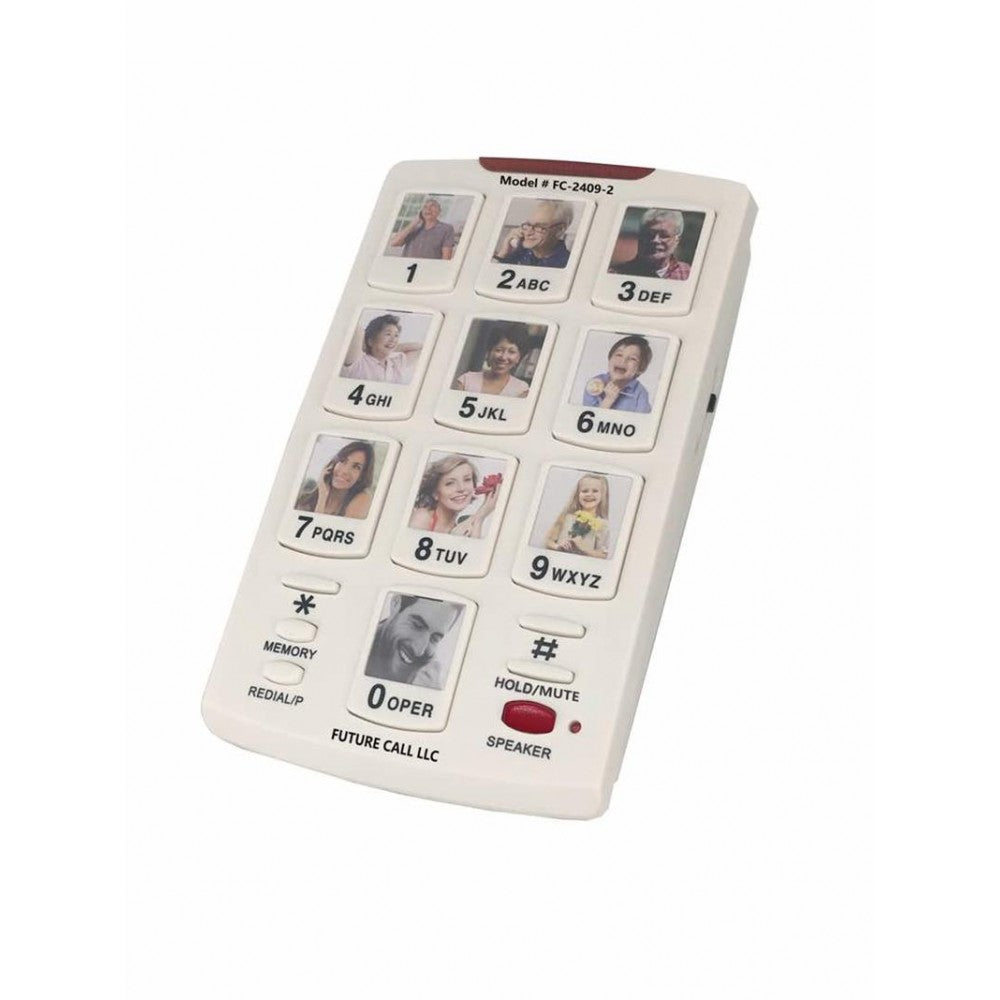
- Best for: a single busy desk, a home office line, or any role where the same ten contacts get dialed daily.
- Skip if: you need multiple lines or a large contact directory.
See the Picture Dialer Phone Box specifications and pricing.
2. Big Button Caller ID Phone: A Picture Button Desk Phone for Shared Desks
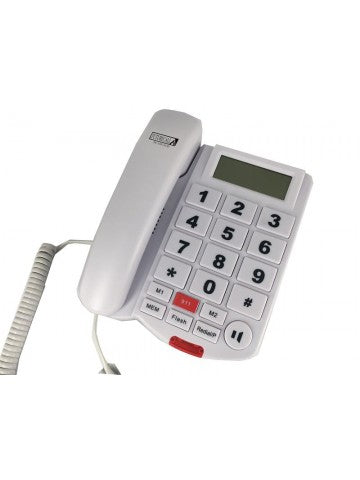
The Big Button Caller ID Phone is a picture button desk phone built around accessibility. It carries twelve memories, and the ten number keys accept a photo of a person, which makes one-touch dialing realistic for staff with memory loss, low vision, or limited dexterity.
The handset volume reaches 40db and the phone is hearing-aid compatible. A large-digit LCD shows caller ID, and a pre-programmed 911 key can be changed or deleted to suit your office policy. The busy-tone detector cuts the speakerphone automatically when the line is engaged, which prevents the confusion of a silent call.
- Best for: shared reception desks, care settings, and offices with older staff or visitors who need a simpler interface.
- Skip if: you want a full keypad as the primary dialing method for complex extensions.
View the Big Button Caller ID Phone details.
3. Industrial Desk Phone: Hotline Reliability for Front Desks
The Industrial Desk Phone is a commercial-grade unit designed to take incoming calls without allowing outgoing abuse. In hotline mode, lifting the handset automatically dials a pre-programmed number up to 25 digits long. That makes it a natural fit for a front desk that must always reach the same internal team.
It works on any analog phone line, PSTN or VoIP, that is FSK or DTMF compatible. The unit is line-powered, retains its programming when disconnected, and can be programmed using any analog phone. The product listing states a one (1) year warranty on all products. Because its compatibility with analog lines and VoIP depends on FSK or DTMF signaling, Ibertech Solutions can help frame this phone’s features within broader business phone system decisions.
- Best for: lobbies, service counters, and any desk where incoming calls matter more than outgoing.
- Skip if: staff need to dial a variety of numbers from the same handset.
Explore the Industrial Desk Phone options.
4. AT&T ML17929 2-Line Corded Telephone: Speed Dial for Multi-Line Offices
The AT&T ML17929 answers a different question: how do you combine picture-style speed dialing with a two-line office setup? It offers an 18-number speed dial, a 100-name phonebook, and 99-entry caller ID history across two lines.
The built-in speakerphone supports multitasking, and three-party conferencing covers quick remote meetings. A 2.5mm headset jack suits staff who take long calls.
- Best for: small offices running two lines, front desks that juggle inbound and outbound, and teams that want speed dial alongside a full directory.
- Skip if: you only need a handful of one-touch numbers and no second line.
Check the AT&T ML17929 features and price.
5. Industrial Wall Phone: Picture Dialing Meets Wall-Mount Durability
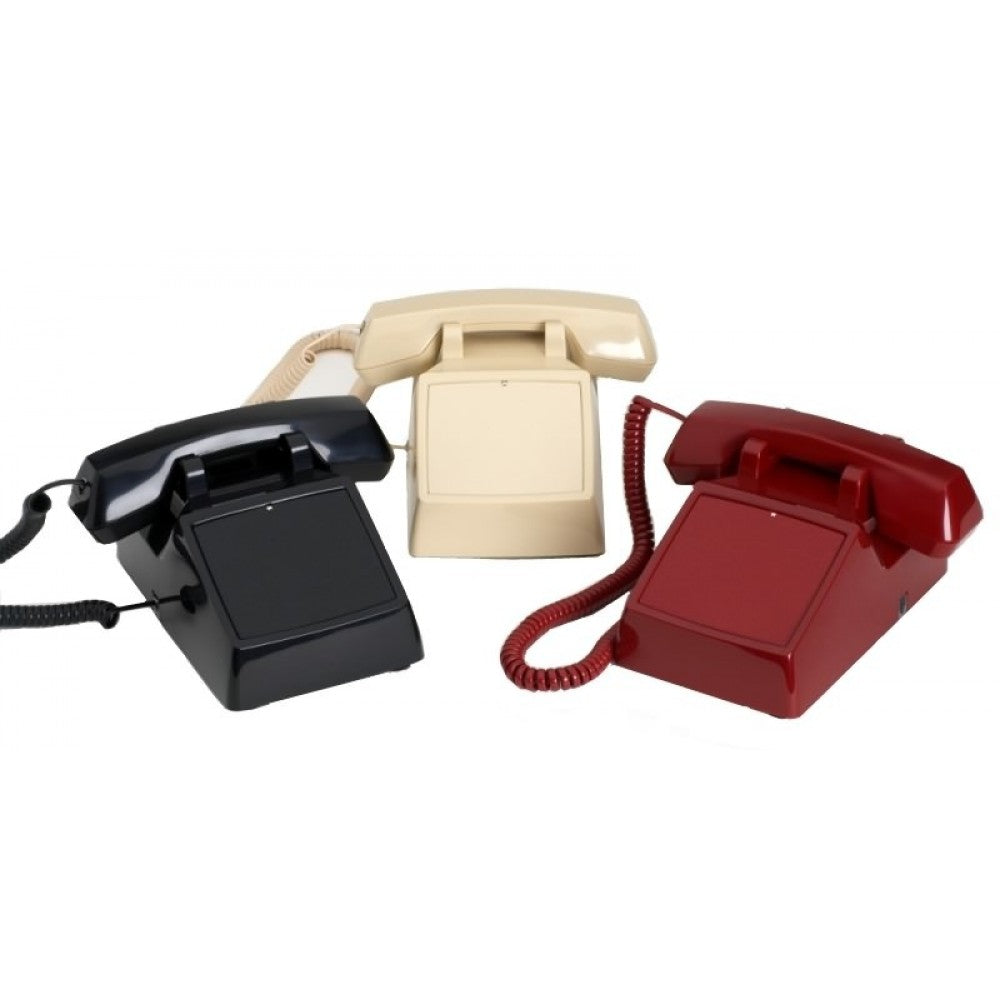
Wall phones earn their place in corridors, workshops, and service areas where a desk phone would be knocked over or buried. The Industrial Wall Phone is a commercial-grade unit with a raised-button keypad built for repeated use, a metal back panel, and a polycarbonate hook switch that holds up under constant handling.
Three options are available: a traditional keypad version, a hotline version with a pre-programmed auto dialer, and an emergency hotline version with an "EMERGENCY" label on the handset. It works on any analog phone line, PSTN or VoIP, that is FSK or DTMF compatible, and it is line-powered. The handset cord stretches up to ten feet.
- Best for: hallways, loading areas, and workshops where a wall-mounted unit survives daily wear.
- Skip if: the phone will sit on a desk and never take physical abuse.
See the Industrial Wall Phone specifications.
6. Industrial Wall Phone No-Dial: Auto-Dial for High-Traffic Areas
The No-Dial version removes the keypad entirely. It is designed to receive calls only, or, in hotline mode, to auto-dial a pre-programmed number the moment the handset lifts.
It ships with a wallplate, a ten-foot handset cord, and an optional vinyl "EMERGENCY" label. Programming is done through any analog line, and the dialer retains its settings when unplugged. Like its sibling, it carries a two-year warranty.
- Best for: emergency points, courtesy phones, and any location where outgoing calls should be impossible.
- Skip if: staff need to place calls to more than one number.
How Picture Buttons Work With VoIP, PBX, and Modern Systems
The compatibility question trips up more office managers than any other. Picture dialer phones fall into two camps. Analog units plug into a standard phone jack and store numbers in the phone itself, so they work with any line that supports tone dialing. VoIP and PBX systems can carry these calls as long as the line is FSK or DTMF compatible, which most modern systems are.
The second camp is native integration: some VoIP desk phones support photo contacts through the platform's own contact list. That approach is flexible but depends on the provider and often on a subscription. For offices that want a phone to keep working when the internet drops, a line-powered analog unit with stored memories is the more resilient choice. The FCC rules on 911 direct dialing are also worth reviewing if your office relies on hotline or emergency dialing, since compliance requirements shape which features you need.
Total Cost of Ownership Across Office Sizes
Purchase price is the easy number to compare. The harder question is what a phone costs over five years of daily use. A unit that fails after eighteen months and gets replaced twice costs more than a durable model bought once.
Volume discounts are available on multi-unit orders of three or more; please contact us for details. The HQ Telecom desk phone buyer's guide walks through the model range if you want to compare specs side by side.
Frequently Asked Questions
What is a picture dialer phone?
A picture dialer phone lets you place a photo or label on a physical key so one touch dials a specific number. The Picture Dialer Phone Box from HQ Telecom supports up to ten picture keys, and the Big Button Caller ID Phone supports twelve memories with picture slots on the 0-9 keys. This makes picture dialer phones useful for reception desks, shared workstations, and employees who need to reach frequent contacts without memorizing extensions.
Do picture dialer phones work with VoIP phone systems?
Yes, most models work with VoIP. The Picture Dialer Phone Box plugs into any RJ11 jack, and HQ Telecom's Industrial Desk Phone and Industrial Wall Phone work on analog lines including PSTN and VoIP that are FSK or DTMF compatible.
How many picture-dial buttons should an office phone have?
Match the count to the number of contacts a role dials daily. A receptionist may need ten or twelve buttons for key departments and frequent clients, while a back-office desk might need four or five. The Picture Dialer Phone Box offers ten memories, and the Big Button Caller ID Phone offers twelve. Buying more buttons than you need adds clutter and makes the right picture harder to find quickly.
What is the difference between a picture dialer phone and a speed-dial phone?
A speed-dial phone stores numbers behind numbered keys you must remember, while a picture dialer phone puts a photo or name card on the key itself. The AT&T ML17929 offers 18-number speed dial, which suits users who know their codes. Picture dialing removes that memory step, which helps new staff, visitors, and anyone with cognitive or visual impairments place a call correctly on the first try.
