

How to Clean a Desk Phone Keypad Safely: A Step-by-Step Guide
Last Updated: November 12, 2026
Quick Summary
To clean a desk phone keypad safely, power off and unplug the phone, blow compressed air across the keys, then wipe with a barely damp disinfectant wipe or microfiber cloth with isopropyl alcohol. Work the seams with an alcohol-dampened cotton swab and let everything dry fully before reconnecting.
- Never spray liquid directly onto the phone; apply cleaner to the cloth instead.
- Use one fresh disinfectant wipe or alcohol cloth per device to stop germs spreading.
- Avoid bleach, ammonia-based glass cleaner, and abrasive pads that can crack plastic and strip numbers.
- Clean high-touch shared phones once a day and single-user phones once a week.
- If a key still sticks after two attempts, stop and call for service.
Table of Contents
- Tools and Safety Precautions Before You Start
- How to Clean a Desk Phone Keypad Safely: Step-by-Step
- Frequently Asked Questions
Tools and Safety Precautions Before You Start
Power the phone off and never spray liquid directly onto it. You need a lint-free or microfiber cloth, isopropyl alcohol wipes, cotton swabs, compressed air, a soft brush, and a dry cloth.
At HQ Telecom, we know that cleaning often goes wrong when too much liquid is used. A Southern Illinois University IT guideline recommends a new disinfectant wipe or a microfiber cloth with isopropyl alcohol per device to stop germs spreading between phones (Information Technology equipment cleaning guidelines).
Watch out: never use bleach, ammonia-based glass cleaner, or abrasive pads, which can crack plastic, strip printed numbers, and leave sticky residue. Our news and articles section covers phones, dialers, and call blockers.
How to Clean a Desk Phone Keypad Safely: Step-by-Step
The safe method is dry-first, damp-second: clear loose debris with air, wipe with a barely damp cloth, then work the gaps with a cotton swab, letting each surface dry before powering back on.
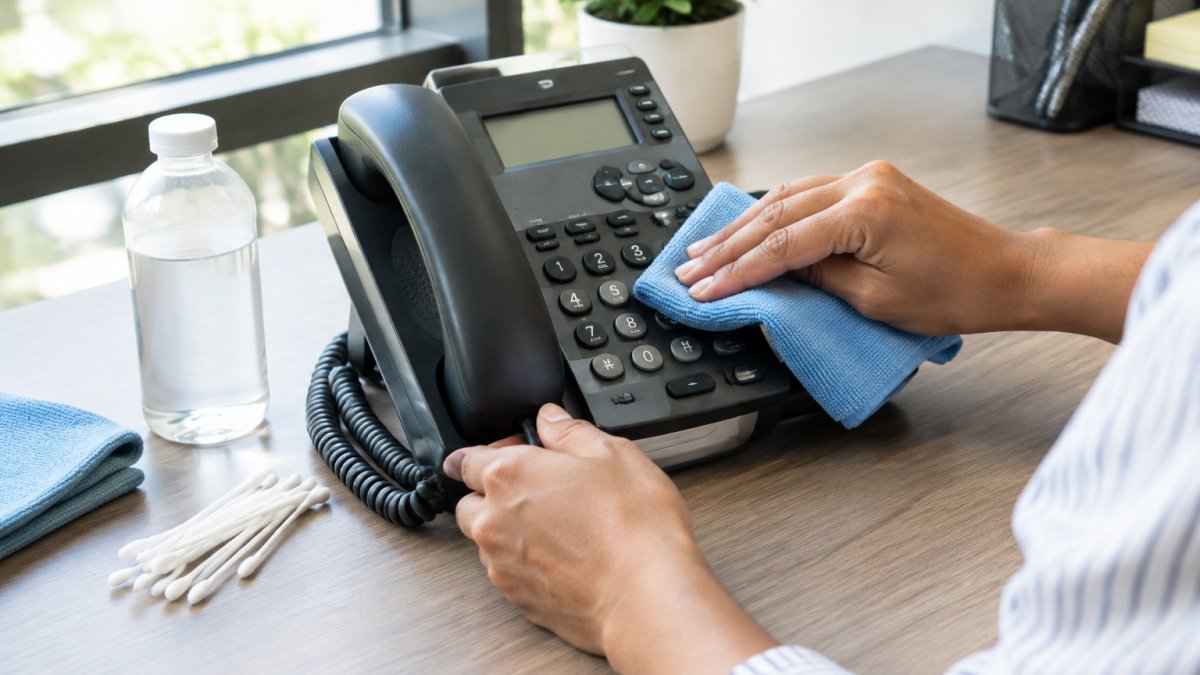
- Power off and unplug. Remove the line cord and any power adapter.
- Clear loose debris. Blow compressed air across the keypad in short bursts at a slight angle.
- Wipe the surface. Use a fresh disinfectant wipe or microfiber cloth with isopropyl alcohol on the keypad, receiver, and mouthpiece.
- Work between the keys. Run an alcohol-dampened cotton swab along the seams, changing swabs as they pick up gunk.
- Dry completely. Let evaporation finish before reconnecting.
How often should you clean office phones?
Clean high-touch phones once a day in shared spaces and once a week for single-user phones. If someone in the office is sick, wipe the handset and keypad at the start and end of each shift.
How do you clean between phone keypad buttons?
Use a cotton swab lightly dampened with isopropyl alcohol along the seams between keys, then a short burst of compressed air to lift loose lint. Never flood the gap, because liquid can seep under the keys and reach the electronics below.
What is a safe cleaner for a telephone keypad?
Isopropyl alcohol on a microfiber cloth or a pre-moistened disinfectant wipe is the safest everyday choice. Check your phone maker's instructions first before choosing a cleaner. Avoid bleach, ammonia, and any residue-leaving cleaner.
How do you fix sticky keys on a desk phone?
Sticky keys usually come from spilled liquid, sugary residue, or buildup under the key cap. Power off, dampen a cotton swab with isopropyl alcohol, work it around the key edges, and press the key gently a few times. If it still sticks after two attempts, stop: the mechanical switch underneath may need a service call.
Are eco-friendly cleaners safe on a phone keypad?
Some are, but check the label. A mild soap-and-water mix on a barely damp cloth is gentle and effective for routine cleaning. Apply any cleaner to the cloth, never to the phone.
Your office phones take more contact than almost anything else on the desk, and a two-minute routine keeps them working and hygienic. HQ Telecom builds phones for exactly this kind of daily use, with waterproof and vandal-proof designs, emergency hotline and auto-dial functions, and models that run on analog or IP/SIP/VoIP lines.
Frequently Asked Questions
Can I use alcohol wipes on a desk phone keypad?
Yes, alcohol wipes are generally safe for most desk phone keypads. Using a new disinfectant wipe or a soft microfiber cloth with isopropyl alcohol for each device is a common cleaning approach. However, avoid wipes that are dripping wet, as excess moisture can seep into the electronics. Wring out the wipe if needed and let the keypad air-dry completely before use.
How do I clean between the buttons on a desk phone?
To clean between phone keypad buttons, first power off and unplug the phone. Use a can of compressed air to blow out loose debris, holding the can upright. Then dampen a cotton swab with isopropyl alcohol and gently run it around each button. Avoid pressing hard or using sharp tools. For sticky residue, a microfiber cloth wrapped around a card edge can help lift gunk without damaging the keypad.
How often should office phones be cleaned?
How often to clean office phones depends on use. Shared phones should be cleaned daily, especially during cold and flu season. Personal desk phones can be cleaned weekly. The handset and mouthpiece deserve extra attention because they contact your face. A quick wipe with a disinfectant wipe or alcohol-dampened cloth takes seconds and reduces germs. Establish a routine and include it in your office cleaning checklist.
