

How to Stop Robocalls on Landlines: 7 Proven Methods
Table of Contents
- Why Landlines Still Get Robocalls (and What Actually Works)
- Register Your Number on the National Do Not Call Registry for Landlines
- How to Block Numbers on a Landline Phone Using Star Codes and Built-In Menus
- Carrier Call-Blocking Features: What Your Phone Provider Offers
- When to Add a Landline Call Blocker Device
- How to Report Robocalls and File a Complaint That Gets Followed Up
- Choosing the Right Approach for Your Landline Setup
- Conclusion
- Frequently Asked Questions
Last Updated: October 21, 2026
Why Landlines Still Get Robocalls (and What Actually Works)
Robocalls are automated phone calls that play a recorded message, and they hit landlines just as hard as mobile phones.
Why do landlines stay a target? Scammers know a home phone often belongs to an older adult who answers every ring.
Here's what most guides get wrong: they promise one magic fix. Carrier services and a call blocker device handle the rest.
Register Your Number on the National Do Not Call Registry for Landlines
Registration on the National Do Not Call Registry is free and takes about two minutes. Visit the official National Do Not Call Registry site, enter your landline number, and confirm the email you receive.
What it does: it makes it illegal for most telemarketers to call you. What it does not do: stop scammers.
A few practical notes:
- Register each landline number separately, including second lines and fax lines.
- Registration does not expire, but re-register if your number changes.
- Political calls, charities, and surveys are generally exempt.
- If a legitimate telemarketer calls after you register, note the date and number. You can file a complaint at the same site.
Many households find the volume of legal telemarketing calls drops within a month. The scam calls keep coming, so keep reading.
How to Block Numbers on a Landline Phone Using Star Codes and Built-In Menus
The fastest free fix is learning how to block numbers on a landline phone directly. Most modern corded and cordless phones include a call-blocking list you can build in seconds.
Start with star codes. These keypad commands work on many carriers, though support varies. Dial the code, listen for a confirmation tone, and hang up.
Star Codes by Carrier and Phone Type
Code |
What It Does |
Notes |
|---|---|---|
*60 |
Block the last incoming caller |
Works on many traditional lines |
*80 |
Unblock the last blocked number |
Reverses *60 |
*77 |
Turn on anonymous call rejection |
Blocks withheld numbers |
*87 |
Turn off anonymous call rejection |
Restores normal ringing |
1160 |
Block the last caller (some digital voice lines) |
Check your provider's guide |
Codes vary by phone provider, so test one and confirm it works before relying on it. Rotary and pulse-dial phones cannot use star codes at all.
Using the Phone's Built-In Blocking Menu
Most phones sold in the last decade have a dedicated call-blocking button or menu. The typical flow:
- Open the call log or settings menu.
- Select "Call Block" or "Block List."
- Add the number manually or block directly from the call history.
- Save, then test by calling from another line.
Carrier Call-Blocking Features: What Your Phone Provider Offers
Your phone provider is the most underused tool in this fight. Many carriers now offer free or low-cost call filtering that works before the phone even rings, but the feature names, availability, and fees vary sharply by provider and by line type. This is the part most guides skip, so here is a provider-by-provider orientation.
What to ask your provider (and what the answers mean)
When you call, use the provider's own vocabulary. Asking for "call blocking" sometimes gets routed to a billing feature; asking for "call filtering," "nuisance call blocking," or "spam labeling" gets you to the right team.
- Do you offer anonymous call rejection and selective call forwarding on my line?
- Is there a robocall labeling or spam-scoring feature on my line?
- Can I forward suspected spam to voicemail automatically?
- Does the service work on digital voice and VoIP lines, or only traditional copper?
Provider-by-provider orientation
Availability differs by line type, so treat this as a starting point and confirm with your provider.
- Traditional copper lines (the legacy analog network): Features are usually limited to star-code style services like anonymous call rejection and selective call forwarding. There is often no network-level spam labeling. If you are on copper, expect to rely more on the phone's built-in block list and a standalone blocker device.
- Digital voice from a cable or fiber provider: These lines typically support a web portal or app where you can manage a block list, enable anonymous call rejection, and sometimes turn on a spam-risk label. Feature names differ by provider, so check the account portal under "phone" or "voice" settings rather than the general settings menu.
- VoIP and hosted phone services: These usually offer the most control, block lists, time-of-day rules, allow lists, and spam labeling, often through an admin portal. Small offices on VoIP should look for "inbound call routing" or "call treatment" settings.
- Cordless handset systems paired with a provider line: The handset's own block list is separate from the provider's network filter. You can use both, but they maintain separate lists, so a number blocked on the handset is not automatically blocked at the network.
The honest limitation
Carrier filters rely on call patterns and reported numbers. A brand-new scam number can slip through for days before it lands on a block list, and a spoofed number that matches a local exchange may never be flagged. That is the gap a device fills. Also note that carrier features usually cannot stop calls that arrive with a completely withheld number unless you enable anonymous call rejection, and that setting will also block legitimate callers who hide their number, such as some medical offices and delivery services.
When to Add a Landline Call Blocker Device
Add a landline call blocker device when registry registration, star codes, and carrier features still leave you answering five or more junk calls a week. A blocker sits between the wall jack and your phone and screens calls as they arrive.
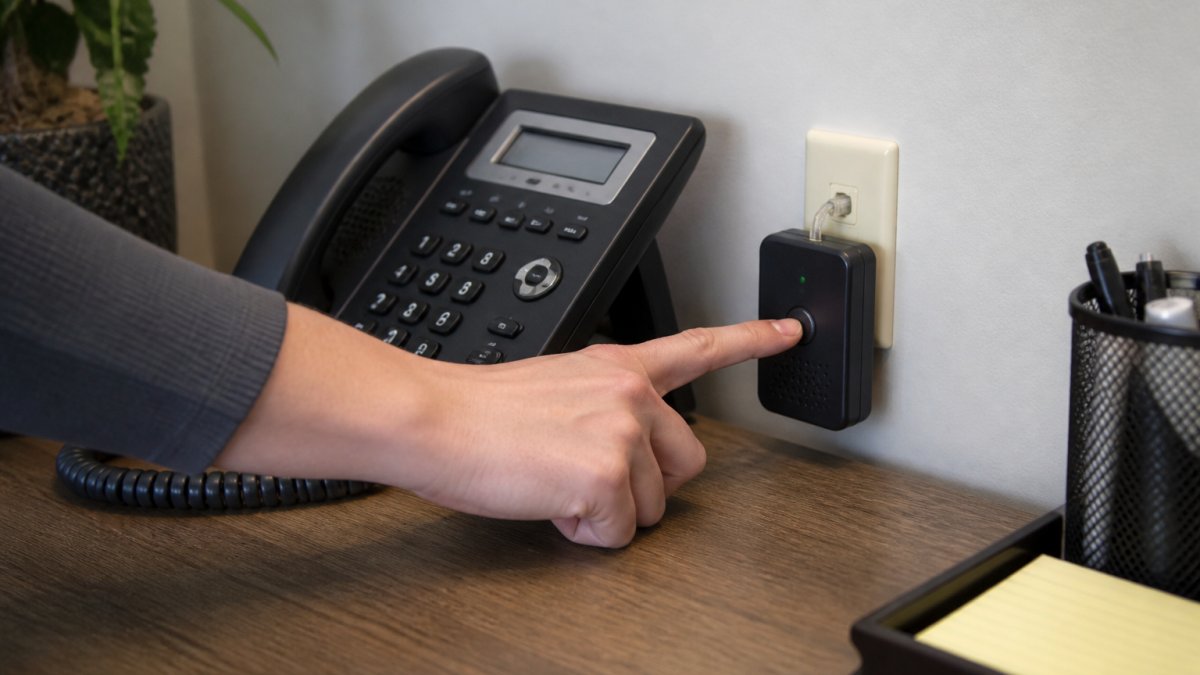
Setup is simple: unplug the phone from the wall, plug the blocker into the jack, plug the phone into the blocker, then power it on.
What a Call Blocker Can and Cannot Stop
A blocker can stop known spam numbers, withheld callers, and area codes you choose to reject.
That's why an allow list matters. Add your family, doctor, pharmacy, and regular clients to the list. Everyone else gets screened.
At HQ Telecom, our phones with advanced incoming and outgoing call blocking are built for offices and households that need a simple, reliable block list.
How to Report Robocalls and File a Complaint That Gets Followed Up
Reporting unwanted calls takes five minutes and helps regulators build cases against repeat offenders, but it helps to know what reporting can and cannot do before you spend the time. This is the part most guides leave out.
What reporting can and cannot accomplish
Reporting can:
- Feed a pattern that regulators use to identify and act against high-volume operations.
- Put a specific number on record if many people report the same one.
- Support enforcement actions against telemarketers who ignore the Do Not Call Registry.
Reporting cannot:
- Stop the individual call you just received.
- Guarantee a response to a single complaint.
- Trace a spoofed number back to the real caller in most cases, spoofing deliberately hides the origin.
In practice, regulators act on volume and patterns, not isolated reports. That is why the quality of your log matters more than the number of complaints you file.
Where to file
File a complaint with the Federal Trade Commission's complaint assistant and, for unwanted telemarketing, with the Federal Communications Commission's consumer complaint center. If your state has its own consumer protection office, a state complaint can add pressure, especially for calls that originate within the state.
What to record before you file
Keep a simple log for two weeks before filing. Patterns matter more than single calls, and a log with ten entries gets more attention than one complaint. Record:
- The exact date and time of each call
- The number that appeared on caller ID, and whether it looked spoofed or was withheld
- What the recording or caller said, the product, the company name if given, and any callback number
- Whether you are registered on the Do Not Call Registry
Following through
Follow-through is where most people stop. Save your complaint reference number, and check back on it. If the same number keeps calling, file again and reference the earlier complaint, repeat reports on the same number are what build a case. If the calls are threatening or impersonate a government agency or a known company, say so explicitly in the complaint; impersonation scams are prioritized differently than ordinary telemarketing.
Choosing the Right Approach for Your Landline Setup
Match the method to your setup, not the other way around. Here's how we'd decide:
Your Situation |
Best First Move |
Add Next |
|---|---|---|
Traditional analog line, few calls |
Do Not Call Registry |
Star codes for repeat numbers |
Digital voice or VoIP line |
Carrier filtering features |
Phone's built-in block list |
Rotary or pulse-dial phone |
Registry registration |
Standalone call blocker device |
Older adult living alone |
Phone with large block button |
Allow list plus blocker device |
Small office with heavy spam |
Carrier filtering |
Multi-number blocker device |
Household with medical or care calls |
Allow list first |
Screening with voicemail fallback |
Test each layer for a week before adding the next. If calls drop to a manageable level, stop there. More tools mean more maintenance, and a half-configured blocker causes more missed calls than it prevents.
For households where a missed emergency call is a real risk, choose a phone with an emergency hotline or auto-dial function and set the allow list carefully.
Conclusion
Robocalls on landlines won't vanish overnight, but a layered defense makes the phone usable again. The challenge is choosing the right combination for your line type and household.
HQ Telecom has spent 30 years building phones that hold up in real homes and offices. Our models include advanced incoming and outgoing call blocking, emergency hotline and auto-dial functions, and flexible analog, IP, SIP, and VoIP connectivity.
Get started with HQ Telecom and take back control of your landline.
Frequently Asked Questions
Does the National Do Not Call Registry actually stop robocalls on a landline?
It reduces calls from legitimate telemarketers but does not stop illegal robocalls, which ignore the registry entirely. Registration is free and takes a few minutes at donotcall.gov, and your number stays listed until you remove it or it disconnects. Expect fewer sales calls within about 31 days, but pair registration with carrier features or a call blocker to catch spoofed and fraudulent calls. Treat the registry as one layer, not a complete solution.
Can I block a phone number on a landline without extra equipment?
Yes, in most cases. Many landline phones have a built-in call-blocking menu where you press a button after receiving a call, or you can enter numbers manually through the settings. Carriers also offer star codes such as *60 for call rejection, though availability varies by provider and phone type. If your phone is an older rotary or pulse-dial model, or your carrier does not support star codes, a standalone call blocker device plugged into the line is the more reliable route.
Will a call blocker stop robocalls without blocking real customers?
A good call blocker lets you build an allowlist of known numbers so important callers always ring through, while unknown or spoofed numbers go to voicemail or get rejected. The trade-off is that first-time callers may be screened, so check voicemail regularly. Look for a device with a large memory for blocked numbers and a clear allowlist function, and test it for a week before relying on it fully.
How do I report robocalls and does it make a difference?
File a complaint with the FTC at reportfraud.ftc.gov or call 1-877-382-4357, and report the call to the FCC at fcc.gov/complaints. Include the number shown on caller ID, the date and time, and what the call was about. Individual reports feed into enforcement actions against illegal operators, so volume matters. Reporting will not stop calls to your line directly, but it supports investigations and helps regulators trace patterns behind spoofed numbers.