

Best Auto-Dialer Desk Phones for Workplace Emergencies: 2026 Guide
Quick Summary
The best auto-dialer desk phones for workplace emergencies are phones that dial one pre-programmed number as soon as the handset is lifted, with no keypad entry needed. Choose a model that matches the location and whether it must dial out or only receive calls, then test the stored number monthly.
- Auto-dial sends one stored number the moment the handset is lifted, unlike speed dial, which needs a button press.
- The Auto-dialer Emergency Desk/Wall Phone is priced at $119.95 and can both dial out and receive calls.
- Program the number to someone monitored around the clock, since an unstaffed switchboard protects no one.
- Test each phone monthly and confirm the call is answered at the far end, not just that dial tone is present.
- Auto-dialer phones can be used with standard analog lines or registered PABX systems, but not digital PABX station ports.
Table of Contents
- What an Auto-Dialer Emergency Desk Phone Does and Who Needs One
- Emergency Hotline Phone with Built-In Auto Dialer: How It Works
- Comparing HQ Telecom's Auto-Dialer Desk and Wall Phones
- Emergency Phone with Speed Dial: Programming Numbers and Using One-Touch Memory
- Installation and Testing Your Emergency Phone Safely
- Automatic Dialer Legality and Compliance for Workplace Emergency Lines
- Choosing Your Workplace Emergency Phone and Booking Your Setup
- Frequently Asked Questions
What an Auto-Dialer Emergency Desk Phone Does and Who Needs One
Last Updated: November 18, 2026
An auto-dialer emergency desk phone is a telephone that dials one pre-programmed number as soon as the handset is lifted, with no keypad entry needed, and it is designed for exactly this kind of quick-response auto-dialer desk phones setup. For office managers at small and medium businesses, that single feature can mean the difference between a call reaching help in seconds and a call that never goes through at all.
Most offices have a standard landline or VoIP line. An auto-dialer phone sits on that line and does one job well: when someone picks up the handset, it calls a number you have set in advance, such as 911 or an on-site security desk. Many models can also receive calls normally, so the phone stays useful for everyday traffic.
This matters most in a few situations: reception areas where visitors may need help, warehouses and workshops where workers may be hurt, elevator lobbies, parking areas, and break rooms where staff spend time away from their desks. In each case, the phone must work without a password, a login, or a second step.
Watch out: programming the number is the step people skip. A phone that was never set to dial 911, or that was set to a number nobody answers after hours, does not protect anyone. Test the number before you rely on the phone.
Emergency Hotline Phone with Built-In Auto Dialer: How It Works
A hotline phone with a built-in auto dialer is a standard analog telephone with a small dialing circuit already inside. When the handset comes off the hook, the circuit sends the stored number down the line. The user does not dial anything.
HQ Telecom's auto-dialer phones are designed to run behind a standard analog phone line, whether landline or VoIP, or behind a registered PABX system. They can auto-dial a pre-programmed number such as 911, and they can still receive calls with an adjustable ringer. The phone is line-powered, so it does not depend on a separate power supply. You can see the full specifications and price on the Auto-dialer Emergency Desk/Wall Phone product page. That is a practical advantage in a power cut, although your own line and exchange equipment still determine whether a call goes through.
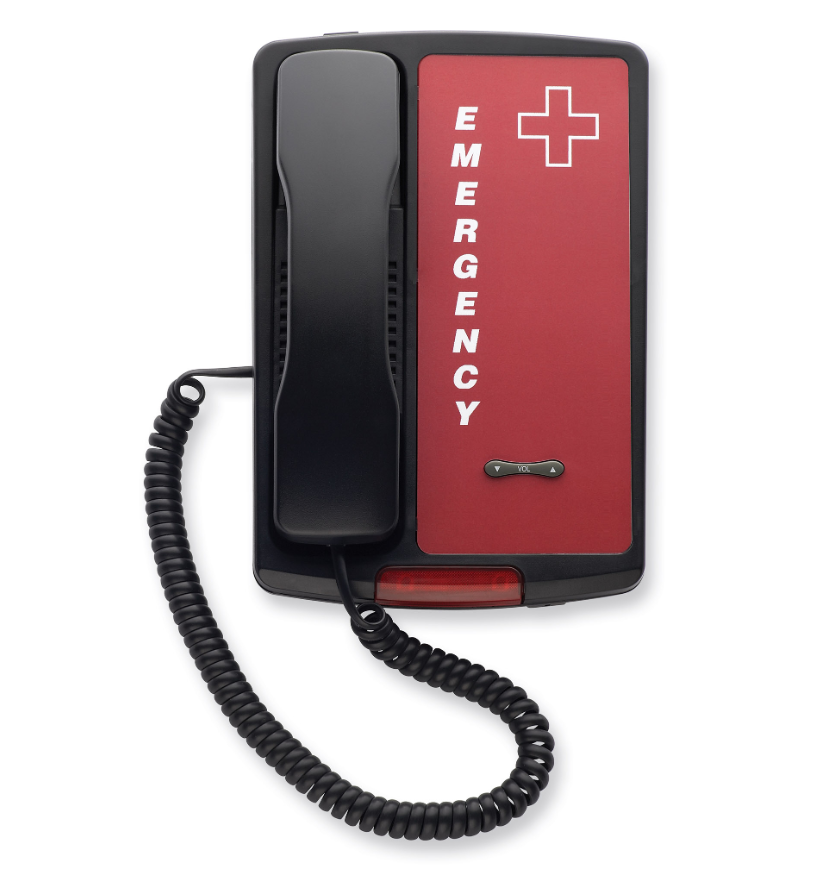
The programming is done through a standard analog phone. The number can be up to 25 digits long, including pauses, so you can add an extension or an access code if your system needs one. Storing the number inside the phone means the programming stays in place even if the handset is lifted or the line is briefly disconnected.
Comparing HQ Telecom's Auto-Dialer Desk and Wall Phones
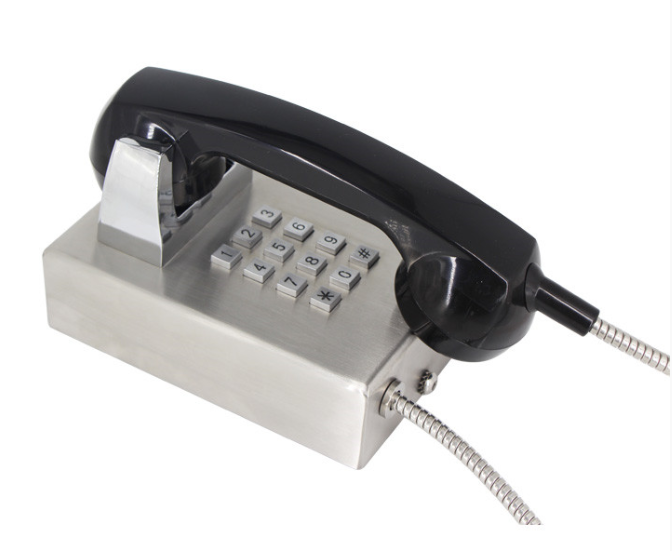
Choosing among emergency phones comes down to two questions: does the phone need to dial out automatically, and is it going on a desk or a wall? For outdoor or high-abuse sites, see the vandal resistant stainless steel wall mount auto dial or no dial phone. The table below shows how each model fits.
| Model | Mounting | Auto-dial | Starting price | Best for |
|---|---|---|---|---|
| Auto-dialer Emergency Desk/Wall Phone | Desk or wall | Yes, pre-programmed number | $119.95 | Offices that need both dialing and receiving calls |
| Industrial Desk Phone | Desk | Hotline model, or no-dial | $99.99 | Receive-only desks, reception and courtesy phones |
| Industrial Wall Phone No-Dial | Wall | Hotline or no-dial | $99.99 | Corridors, lobbies, elevators |
| Trim-Style Emergency Wall/Desk Phone (Red) | Wall or desk | Yes, pre-set to 911 | $99.00 | Clearly visible emergency points |
Starting price
Auto-dialer Emergency Desk/Wall Phone
This is the most flexible option in the range. It auto-dials a pre-programmed number when the handset is taken off-hook and can also receive calls, with an adjustable ringer and an LED visual alert. It works as a desk phone or a wall-mount phone. The handset is hearing-aid compatible, and the phone carries FCC Part 68, FCC Part 15 and UL 1459 certification, with a one-year warranty.
It is designed for use behind a standard analog phone line or a registered PABX system, and cannot be used with digital PABX station ports, so check your system type before ordering.
Industrial Desk Phone and Industrial Wall Phone No-Dial
These commercial-grade phones come in black, red and ash/beige. The desk model is available as a no-dial phone built for incoming calls only. You can choose a no-dial version that rings only, or a hotline version that auto-dials a stored number. For the receive-only option, see the No Dial Emergency Hotline Desk Phone.
The wall phone is a similar industrial design and is supplied with a wallplate, a coiled handset cord and removable "EMERGENCY" vinyl letters. It weighs 1.5 lbs, and the hotline model carries a two-year warranty. Both models are powered by the telephone line.
Emergency Phone with Speed Dial: Programming Numbers and Using One-Touch Memory
Speed dial and auto-dial are not the same thing. Auto-dial sends one stored number the moment the handset is lifted. Speed dial waits for a button press and then sends a stored number. For a workplace emergency, auto-dial is safer, because a person in a panic may not press anything at all.
Our Big Button Caller ID Phone, priced at $79.99, offers one-touch memory. It has 12 memories in total, a pre-programmed 911 key that can be changed or deleted, and a big digit LCD display. Its memories are backed up for life.
Program every emergency phone with a number someone monitors around the clock. Write the stored number on a label beside the phone and check it after each change. A common mistake is programming a main switchboard number that is unstaffed at night.
Installation and Testing Your Emergency Phone Safely
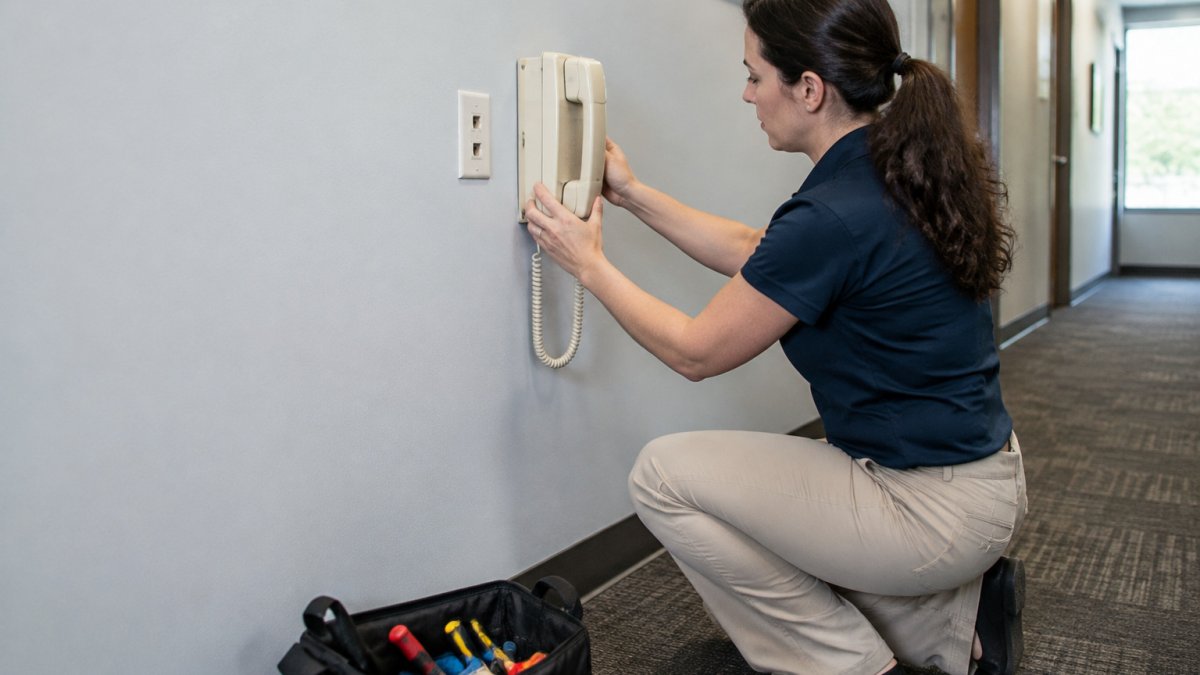
Installing an emergency phone should be done with care, because the phone's only job is to work on the day nobody expects to use it. Before you start, confirm that the wall or desk surface can take the phone's weight. The Auto-dialer Emergency Desk/Wall Phone weighs 3.1 lbs, while the Industrial Wall Phone No-Dial weighs 1.5 lbs. A hollow drywall anchor that holds a picture frame may not hold a phone that gets grabbed in a hurry.
Follow these steps:
- Choose a spot that is visible, reachable without a key or code, and close to a working analog line or wall jack. Avoid placing it behind a door, inside a cabinet, or above a counter that a shorter person cannot reach.
- Mount the wallplate, then connect the phone's RJ11 plug to the socket. Confirm the jack is live with a known-good analog phone before you mount anything.
- Program the stored number using an analog phone on the same line, following the manual. Write the stored number on a label beside the phone and record it in your maintenance log.
- Confirm the programming by lifting the handset and checking that the call connects to the intended number, not just that dial tone is present.
- Hang up and repeat the test at least once a month, and after any change to your phone line, PBX, or provider.
Testing is where most workplaces fail. A phone can produce dial tone and still fail to reach the right destination, so the test must be handled by whoever answers the stored number. Tell them the test is happening, ask them to confirm the caller ID and the audio quality, and log the date, the tester's name, the number reached, and the result. A common pattern is to test once at installation and never again; the phone then sits for years with a dead handset cord or a reprogrammed number nobody remembers changing.
Watch out: a monthly test that only checks dial tone is not a test. The call must be answered at the far end, and the person answering must confirm they can hear and be heard.
On power, these phones are line-powered, which helps in a mains outage, but line power is not the same as network power. Ask your provider whether their service supports emergency calling during a power outage, and whether they provide battery backup for the customer-premises equipment. Label the phone with the number it dials so a panicked user is not guessing.
Automatic Dialer Legality and Compliance for Workplace Emergency Lines
An auto-dialer on an emergency line is designed for a narrow purpose: calling for help when a person lifts the handset. That is different from automatic calling used for marketing or mass messages, which is regulated more strictly under rules such as the U.S. Telephone Consumer Protection Act and the FCC's autodialer rules. Keep the emergency phone's programming limited to a single safety number, and do not use it to send automated sales or marketing calls. If your organization also runs outbound campaigns, keep that equipment and those numbers physically and administratively separate from the emergency phone.
Compliance for a workplace emergency phone can involve several overlapping requirements. Work through a short checklist rather than rely on a single certification:
- Accessibility (ADA). In the United States, the Americans with Disabilities Act addresses access to communication for people with disabilities. The Auto-dialer Emergency Desk/Wall Phone is hearing-aid compatible and includes an LED visual alert. Confirm with your compliance adviser how the ADA applies to your site.
- Hearing-aid compatibility (FCC). The Auto-dialer Emergency Desk/Wall Phone is listed as ADA/FCC hearing-aid compliant. Keep the product specification with your safety file.
- Network and equipment certification. FCC Part 68 covers connection to the telephone network, FCC Part 15 covers electromagnetic interference, and UL 1459 is a safety standard for telephone equipment. These listings show the product was tested to those standards; they do not, on their own, make a particular installation compliant with your local workplace rules.
- Life-safety and fire code. Whether a specific phone meets a fire-code requirement depends on your occupancy type and local authority, so confirm with your local fire marshal or safety officer rather than assuming a desk phone meets a code obligation.
- Elevator and area-of-refuge phones. Phones in elevators, stairwells, and areas of refuge may be governed by separate requirements. A standard desk auto-dialer should not be assumed to substitute for a required elevator phone.
- Workplace safety. Document the phone in your emergency action plan.
Rules differ by country and by industry, so check with your regulator or a qualified adviser before you rely on any phone for a specific compliance obligation. Our phones carry the certifications listed in their specifications. Treat those listings as a starting point for your compliance file, not as a substitute for a site-specific review.
Choosing Your Workplace Emergency Phone and Booking Your Setup
Start with the location, not the model. Ask where a person in trouble would be most likely to need a phone, and whether that person could reach a desk phone or would need a wall phone at standing height. Then decide whether the phone must dial out on its own. If it must, choose one of the auto-dial models. If the spot only needs to receive calls, a no-dial phone is simpler and cheaper.
Keep the stored number the same across all phones so that anyone can use any of them.
When you are ready, browse the emergency phone range on our website and compare the specifications side by side.
Frequently Asked Questions
What are the best desk phones for an office setting?
For a phone mainly used to receive calls, HQ Telecom's Industrial Desk Phone (from 99.99) is available as a no-dial or hotline model. It works on any analog line (PSTN or VoIP) and retains its programming even when disconnected. If the phone also needs to dial out in an emergency, the Auto-dialer Emergency Desk/Wall Phone (from 119.95) auto-dials a pre-programmed number, such as 911, when the handset is lifted, and it can also receive calls. Choose based on whether outgoing emergency dialing is required.
Are automatic dialers legal for workplace emergency calls?
Rules on automated calling vary by country and region, so confirm the requirements that apply to your site with your local telecom regulator or legal adviser before installation. The phones are FCC-certified (Part 68 and Part 15) and UL 1459 listed, and the Auto-dialer Emergency Desk/Wall Phone is ADA/FCC hearing aid compliant.
How do you test an emergency auto-dialer phone safely?
Test the line with a single pre-programmed number that you have agreed in advance, such as a facilities or security extension, rather than live 911 during business hours. Lift the handset, confirm the call connects automatically, then hang up. Check that the programming survives a line disconnection. Repeat the test after any line or PBX change and record the date, so the test is part of routine maintenance.
How many emergency contacts can an auto-dialer phone store?
Each HQ Telecom auto-dial model stores one pre-programmed number that it dials automatically when the handset is taken off-hook, for example 911 on the Trim-Style Emergency Wall/Desk Phone. The number can be up to 25 digits long, including pauses, and can be reprogrammed. If you need several contacts, the Big Button Caller ID Phone (from 79.99) offers 12 memory locations for one-touch dialing, with a pre-programmed 911 key that can be changed or deleted.
