

Best Desk Phones for Small Offices: 2026 Buyer's Guide
Table of Contents
- Quick Comparison: Best Desk Phones for Small Offices
- How We Evaluated These Desk Phones
- 1. AT&T ML17929 2-Line Corded Telephone: Best for Shared Lines
- 4. Picture Dialer Phone Box: Best for One-Touch Speed Dialing
- 5. Auto-dialer Emergency Desk/Wall Phone: Best for Emergency and Wall-Mount Use
- VoIP Desk Phones for Business: What Changes When You Go Internet-Based
- Frequently Asked Questions
Last Updated: October 21, 2026
Quick Comparison: Best Desk Phones for Small Offices
Choosing the best desk phones for small offices comes down to matching the hardware to how your team actually works. At HQ Telecom, we have spent 30 years supplying durable, commercial-grade telephones, and we have watched offices waste money on features they never use.
Below is a straight comparison of five desk phones we recommend for small offices. We will show you exactly how each one earns its place, and where it falls short.
| Model | Price | Lines | Best For | Standout Feature |
|---|---|---|---|---|
| AT&T ML17929 2-Line Corded | $79.99 | 2 | Shared lines | 3-party conferencing |
| Industrial Desk Phone | $99.99 | 1 | Incoming-call-only desks | Auto-dial on off-hook |
| Big Button Caller ID Phone | $79.99 | 1 | Accessibility and front desks | 40db handset volume |
| Picture Dialer Phone Box | $69.99 | 1 | One-touch speed dialing | 10 picture memory keys |
| Auto-dialer Emergency Desk/Wall Phone | $119.95 | 1 | Emergency and wall-mount use | Desk or wall-mount option |
How We Evaluated These Desk Phones
We judged each desk phone against six practical criteria, and we weighted them for how a small office actually buys: call quality and reliability, line capacity, compatibility, ease of setup and deployment, accessibility and usability, and total cost of ownership. A phone that needs constant maintenance is not cheap, even at a low sticker price. Our 30 years in this market and our BBB Standards for Trust A+ rating inform every recommendation we make.

The hardware specifications that actually separate these models
Most roundups list features without putting the numbers side by side. Here is the comparison we use internally when a small office asks us to shortlist handsets.
| Specification | AT&T ML17929 | Industrial Desk Phone | Big Button Caller ID Phone | Picture Dialer Phone Box | Auto-dialer Emergency Phone |
|---|---|---|---|---|---|
| Line capacity | 2 lines | 1 line | 1 line | 1 line | 1 line |
| Display | LCD with Caller ID | None | Big-digit LCD | None | None |
| Headset support | 2.5mm jack | None | Hearing-aid-compatible handset | Hearing-aid-friendly speakerphone | Hearing-aid-compatible handset |
| Speakerphone | Built-in | No | No | 2-way | No |
| Memory keys | 18 speed dial, 100-name phonebook | None (hotline auto-dial up to 25 digits) | 12 memory keys, 10 picture keys | 10 picture keys, one- or two-touch | Pre-programmed auto-dial |
| Power source | AC adaptor (DSL filter required) | Line-powered | Line-powered, no batteries | Line-powered | Line-powered |
| Wall-mount | No | No | Yes | No | Yes |
| Conferencing | 3-party | No | No | No | No |
| Certifications | , | , | , | , | FCC Part 68, FCC Part 15, UL 1459 |
Two specs deserve a note. First, line capacity is the number that most often gets overbought: a two-line phone is the practical ceiling for most small offices, and single-line models cover reception, back-office, and emergency desks.

Compatibility: check these four things before you buy
Every phone on this list works on a standard analog line, and several also work behind VoIP or PABX systems. That matters because small offices rarely run a single, tidy network. Before ordering, confirm four things with your provider or IT contact:
- Line type. Analog PSTN, VoIP with an analog terminal adaptor (ATA), or a digital PABX station port. The Auto-dialer Emergency model, for example, cannot be used with digital PABX station ports.
- Signaling. For auto-dial and Caller ID features, confirm the line is FSK or DTMF compatible, as the Industrial Desk Phone requires.
- DSL filtering. If you run DSL on the same line as the phone, the AT&T ML17929 needs a filter, factor that into setup.
- Power and cabling. Confirm whether the desk has an AC outlet (AT&T ML17929) or relies on line power, and whether you need a data port to extend the line to a fax or modem (Auto-dialer model).
If you are unsure what your line supports, check with your provider before ordering. For a plain-language overview of how internet-based calling differs from a traditional line, the FCC Consumer Guide to VoIP is a useful starting point.
Total cost of ownership, not sticker price
A desk phone's purchase price is only the first line on the invoice. When we compare models for a small office, we add up the handset, any AC adaptor or DSL filter, headset (if the role needs one), installation time, and the ongoing service or line charge. A $79.99 single-line phone that needs a filter and an adaptor can cost more over three years than a line-powered model at a similar price.
1. AT&T ML17929 2-Line Corded Telephone: Best for Shared Lines
The AT&T ML17929 is our top pick for offices that run two lines through a single desk. It handles 2-line operation, Caller ID and Call Waiting, and a built-in speakerphone that lets you keep working while you talk.

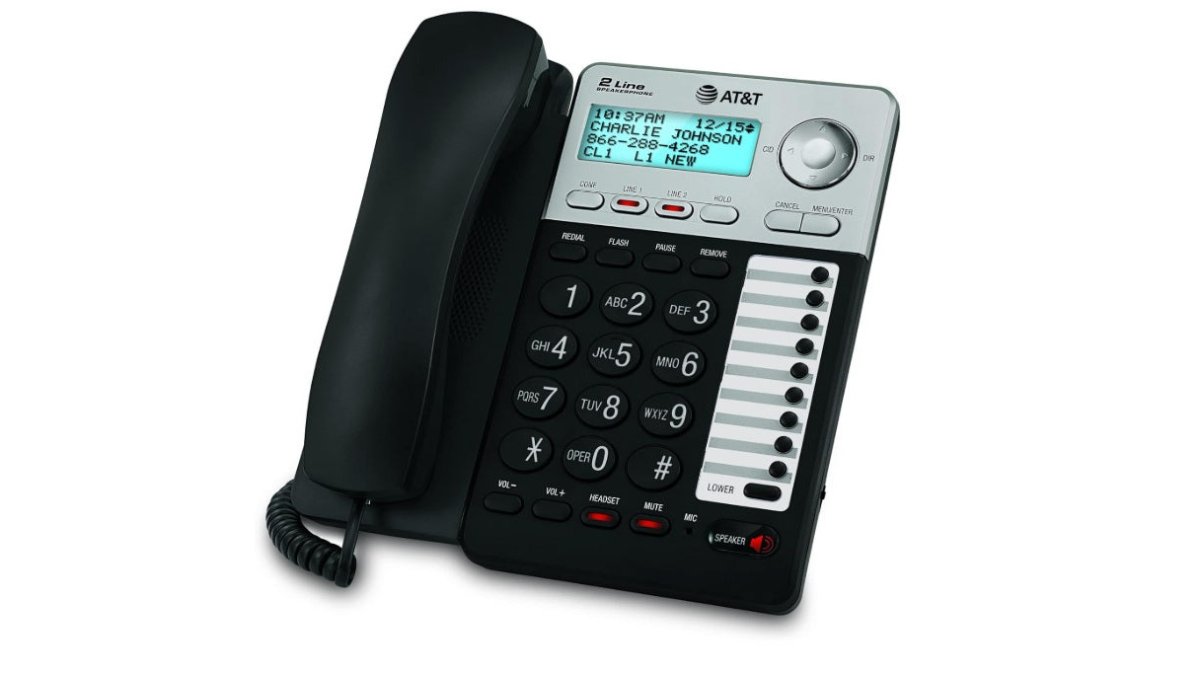
Three-party conferencing makes quick remote meetings possible without a separate bridge. The 18-number speed dial is handy for the numbers your team dials daily.
(https://www.fcc.gov/accessibility/program).4. Picture Dialer Phone Box: Best for One-Touch Speed Dialing
Speed matters at a busy desk, and the Picture Dialer Phone Box delivers it. It supports up to ten one-touch or two-touch memory picture keys, so the numbers you call most are a single press away.
The 2-way speakerphone is hearing-aid friendly and has volume control. A ringer on/off switch and a bright in-use LED round out the practical touches.
5. Auto-dialer Emergency Desk/Wall Phone: Best for Emergency and Wall-Mount Use
When a phone's main job is to reach help fast, the Auto-dialer Emergency Desk/Wall Phone earns its place. It auto-dials a pre-programmed number, such as 911, the moment the handset lifts, and it also receives calls with an adjustable ringer.
AT&T ML17929 2-Line Corded Telephone →
A data port lets you extend the line to a fax, modem, or answering machine. The hearing-aid-compatible handset has four volume levels, and a visual LED alert doubles as a message-waiting light.
VoIP Desk Phones for Business: What Changes When You Go Internet-Based
Switching to internet-based calling changes what a desk phone must do, and it changes what you should check before you buy. A VoIP desk phone connects over your network rather than a traditional line, so call quality depends on your internet connection and your setup.
The trade-off is reliability. An analog phone keeps working when the internet drops; a VoIP phone does not. For guidance on network readiness, the FCC guide to broadband and VoIP service explains what to check.
The compatibility checks most VoIP roundups skip
Before you pair a desk phone with a VoIP service, confirm these five points. They are the ones that most often turn a smooth rollout into a support ticket.
- SIP support and provisioning. Confirm the handset supports SIP and that your provider can auto-provision it. Manual provisioning works, but it adds setup time per desk.
- Power over Ethernet (PoE). Many VoIP desk phones draw power over the network cable via PoE. If your switch does not supply PoE, you need a power injector or an AC adaptor per phone, a cost that rarely appears in the sticker price.
- Network readiness. Voice traffic is sensitive to latency and jitter. A common pattern is to put voice on its own VLAN or apply quality-of-service (QoS) rules on the router so large downloads do not degrade call quality.
- Analog terminal adaptor (ATA) for legacy handsets. If you want to keep an existing analog desk phone on a VoIP service, an ATA converts the analog signal to SIP. This is the cheapest path for offices that are not ready to replace every handset.
- Emergency calling and fallback. Confirm how the provider routes emergency calls and keep at least one line-powered analog phone on a separate line as a fallback.
Practical deployment for a small office
A small-office VoIP rollout is usually less about the handset and more about the network. The pattern we see work: provision phones from a template so every desk has the same buttons and directory, label the ports on the switch, and keep a spare handset and a spare power injector on the shelf.
For multi-user or multi-location offices, confirm the provider supports shared line appearances and a common directory across sites. That is the feature that makes a desk phone feel like part of a team system rather than a standalone handset.
Frequently Asked Questions
What features should a small-business desk phone have?
The essentials are a clear handset and speakerphone, Caller ID with history, a phonebook or speed-dial memory, and a headset jack if staff take long calls. Small offices with shared lines benefit from two-line operation and three-party conferencing, while front desks often need call blocking and large, legible buttons. Match the feature set to how the desk is used rather than buying the most features available.
Are VoIP desk phones a good choice for a small office?
VoIP desk phones for business work well when you already have stable internet and want number portability, remote extensions, or cloud-based call routing. The catch is power and connectivity: many VoIP setups rely on the network, so check whether your phones stay usable during an internet outage. Corded analog phones connected to a plain line remain the simpler option where reliability outweighs flexibility.
How much does a desk phone cost?
In this shortlist, one-time hardware prices run from 69.99 to 119.95 per phone, before any line rental, VoIP subscription, or installation work. Business phone system cost depends more on the service behind the phones than the handsets themselves, so budget for both. Buying three or more units can qualify for volume discounts, which lowers the per-desk figure for a growing office.
Do small offices need a desk phone system or individual phones?
Individual desk phones suit offices where each person mainly answers their own line and call volume is modest. A shared system makes more sense when several people need to pick up the same incoming calls, transfer between desks, or run conference calls. Map your call routing first, then choose phones that support it, rather than adding hardware and hoping the workflow follows.
Will these desk phones work if the internet goes down?
It depends on the line behind them. Phones connected to a traditional analog line keep working during an internet outage, and the hotline and auto-dialer models are designed for exactly that kind of reliability. VoIP-based setups depend on your network connection, so if uptime is critical, keep at least one analog-backed phone for emergency and incoming calls.
Running a small office phone system should not mean guesswork or constant maintenance. HQ Telecom builds durable desk and wall-mount phones with emergency hotline and auto-dial functions, advanced call blocking, and flexible analog, IP, SIP, and VoIP connectivity, all backed by 30 years of experience. Get started with HQ Telecom and equip your office with phones that stay reliable when it counts.