

Reliable Emergency Phones for Seniors: 2026 Guide
Table of Contents
- What Makes an Emergency Phone Reliable
- Quick Comparison: Reliable Emergency Phones for Seniors
- Landline Phones With Emergency Buttons: One-Touch and Picture Dialing
- Auto-Dial Hotline Phones for Off-Hook Emergency Calling
- Senior Medical Alert Phones and Monitored Response Options
- Best Cell Phones for Seniors: When Mobile Makes Sense
- How to Choose an Emergency Phone for an Older Adult
- Total Cost of Ownership and Caregiver Setup
- Conclusion
- Frequently Asked Questions
Last Updated: October 22, 2026
What Makes an Emergency Phone Reliable
Reliable emergency phones for seniors are corded or cellular devices that let help be reached with one action, even under stress, poor vision, or a power outage. At HQ Telecom, 30 years of experience in telecommunications has taught us that an emergency phone is only as reliable as its weakest link, the dialing step, the power supply, or the network behind it.
We treat "reliable" as a checklist, not a feeling. A phone earns the label when it clears four tests:
- It works without house power. Corded landline phones draw current from the phone line itself, so they keep working during an outage that takes down a cordless base station.
- It removes dialing from the equation. A pre-programmed 911 key or off-hook auto-dialer means no fumbling for glasses or remembering digits.
- It is loud and visible. A hearing aid compatible handset with amplified volume and a flashing ringer light covers both hearing and vision loss.
- It fails in predictable ways. The worst failure is a silent one: a dead battery, an unplugged cord, or a phone the owner never learned to use.
Below, we break down the categories, compare models, and show how to choose. First, the distinction most guides skip:
Emergency Phones vs. Ordinary Cell Phones vs. Medical Alert Devices
An emergency phone is a telephone with a built-in shortcut to help, either a dedicated 911 key, picture dialing, or an auto-dialer that fires the moment the handset lifts. An ordinary cell phone can call 911, but it requires unlocking, finding the dialer, and typing three digits, which is a lot to ask mid-fall. A monitored medical alert device is a different product class: it connects to a paid response center rather than to a person the user knows.
Each solves a different problem at a different cost: a cell phone depends on coverage and a charged battery, a monitored alert on a monthly subscription and a working in-home base, and a corded emergency phone only on the phone line. Many families end up with two of the three, and that redundancy is usually right.
Real-World Failure Modes: What Actually Breaks in an Emergency
The checklist tells you what a good phone does.
Cellular coverage and dead zones. A mobile phone or cellular medical alert only works where there is signal; basements, metal-sided buildings, rural properties, and concrete garages can drop to nothing.
Power outages. A cordless base station goes dead when house power goes out, even though the phone line is still live.
Dropped calls and incomplete connections. A call that drops before the user can explain the situation is nearly as bad as no call.
GPS limitations. Location sharing on a mobile phone or monitored pendant depends on GPS, which is weak indoors and can be off by a block or more in dense areas.
When the user cannot speak or press a button. If the person is unconscious, confused, or unable to reach the device, a button-based phone cannot help.
How We Judge Reliability
Because "reliable" is easy to claim and hard to verify, we assess every phone against measurable criteria:
- Call completion. Does a test call connect on the first attempt, every time, from the room where the phone will live?
- SOS response time. How many actions and how many seconds pass between the person deciding to call and the call being placed?
- Battery endurance. For any battery-dependent device, how long does it run on a charge, and how quickly does capacity fade?
- Signal performance. Does the device hold a connection in the actual building, including basements and outbuildings?
- Ease of use under stress. Can a person who is confused, panicking, or on the floor still trigger the call?
Those five criteria are the lens for the rest of this guide. A phone that scores well on all five is reliable in the way that matters; one that scores well on features but fails any of them is a risk you should know about before you buy.
Quick Comparison: Reliable Emergency Phones for Seniors
The table maps our own line against the job each phone does best.
| Phone | Price | Dialing Method | Power Source | Best For |
|---|---|---|---|---|
| Big Button Caller ID Phone | $79.99 | 911 key, picture keys, one-touch | Phone line | Bedside or kitchen phone for a parent with memory loss |
| Picture Dialer Phone Box | $69.99 | 10 picture keys | Phone line | Family contacts and a caregiver line |
| Trim-Style Emergency Phone | $99.00 | Off-hook auto-dial to 911 | Phone line | Hallway or entryway one-motion calling |
| Auto-dialer Emergency Desk/Wall Phone | $119.95 | Off-hook auto-dial, receives calls | Phone line | A phone that must still take incoming calls |
| Auto Voice Dialer | $249.99 | Button press, recorded message | Phone line | Alerting several family members at once |
| Industrial Wall Phone No-Dial | $99.99 | Off-hook hotline | Phone line | Garages, workshops, outbuildings |
| Vandal & Weather Proof Wall Phone | $339.99 | Off-hook auto-dial, no keypad | Phone line | Porches, pool areas, exposed locations |
The pattern is consistent: every unit in this table is line-powered, so none of them need a battery to place a call.

Landline Phones With Emergency Buttons: One-Touch and Picture Dialing
Landline phones with emergency buttons are the simplest reliable option for an older adult who wants a familiar handset and no charging routine. The principle is one action, one outcome: press a labeled key, reach a person.
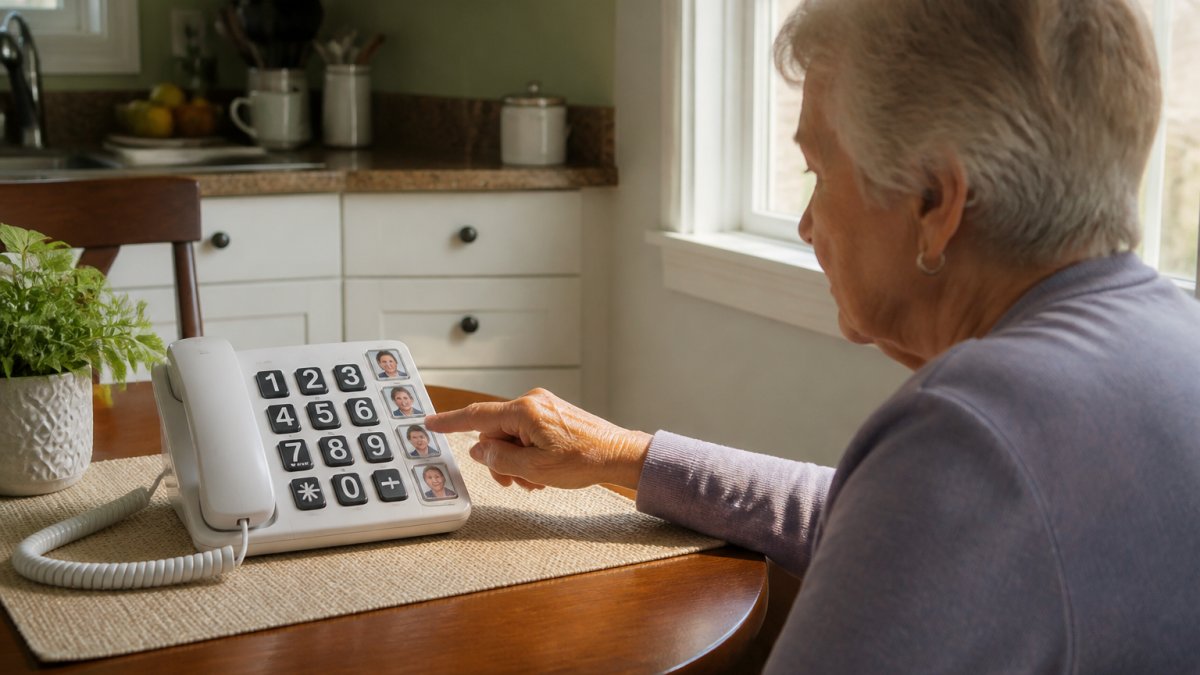
Big Button Caller ID Phone
Our Big Button Caller ID Phone is the model we recommend first for most households, because of the picture keys. You can stick a photo of a person on each of the ten number keys and use one-touch dialing, exactly the feature that helps when memory or cognition is declining.
The 911 key comes pre-programmed but can be changed or deleted, so you decide whether it stays. A large-digit LCD shows the caller's number, the handset volume switches between medium, high, and very high with 40dB of amplification, and the phone is hearing aid compatible.
The limitation worth naming: it is a single-line corded phone with caller ID number only, not name-and-number display. If the household wants to see names, that is a different purchase.
Picture Dialer Phone Box
For families who mainly want a short list of people on speed dial, the Picture Dialer Phone Box holds ten one-touch or two-touch picture keys and a two-way speakerphone. A toggle switch flips between normal dialing and one-touch mode, the detail that makes it work for someone with dementia: the caregiver sets the mode once, and the keypad stops being a puzzle.

It also has a ringer volume switch with an off position and a bright in-use LED that flashes on incoming calls. Like the model above, it is line-powered with lifetime memory backup. At $69.99 it is our pick when the goal is reachable family contacts rather than a single emergency button.
Auto-Dial Hotline Phones for Off-Hook Emergency Calling
Auto-dial hotline phones remove the button press entirely: lifting the handset starts the call. For someone who may be confused, panicking, or on the floor, that single motion is the most reliable trigger available.
Trim-Style Emergency Wall/Desk Phone
The Trim-Style Emergency Off-Hook Hotline Dialer Phone ships pre-programmed to dial 911 the moment the handset comes off the hook. It can be re-programmed to any number up to 25 digits, including pauses, so a caregiver or neighbor can be the first call instead.
At $99.00 and 14 ounces, it mounts on a wall or sits on a desk, and the red housing makes it easy to find in a hurry. This is the model we suggest for a hallway or beside an exterior door, where the goal is to grab and lift.
Auto-Dialer Emergency Desk/Wall Phone
The Auto-dialer Emergency Desk/Wall Phone adds a capability the trim-style unit lacks: it also receives calls, with an adjustable ringer and a visual incoming-call lamp. That suits a senior who still wants a working household phone but needs the emergency shortcut built in.
It auto-dials a pre-programmed number when the handset lifts, offers four volume levels on the handset and speakerphone, and includes a data port for a fax or answering machine. It works behind a standard analog line or VoIP service, though not on digital PBX station ports. At $119.95 it is the pick when the phone has to do double duty.
Senior Medical Alert Phones and Monitored Response Options
Senior medical alert phones sit between a telephone and a monitored medical alert system, and the difference is who answers. A hotline phone dials a person you chose; a monitored service dials a response center staffed around the clock and paid for monthly.
Our Auto Voice Dialer allows you to record a message (40 seconds max) and store up to 8 phone numbers. When the button is pressed, it will dial each number (one at a time) and play the recorded message.

What it does not do is dispatch help. If the household needs guaranteed response when nobody answers, a monitored service is the honest recommendation, and the phone should be a backup rather than a replacement.
Best Cell Phones for Seniors: When Mobile Makes Sense
The best cell phones for seniors reduce the number of steps between the person and a call, usually a simplified smartphone with large icons or a flip phone with big keys. Mobile makes sense when the person is out of the house regularly, drives, or has no landline service at all.
Here is where we push back on the usual advice: a cell phone is not a substitute for a corded emergency phone at home. It needs charging, coverage, and the owner keeping it within reach, and in a fall, the phone is often in another room.
The practical setup for a mobile-first senior:
- Enable the emergency SOS feature in the phone's settings and add two or three emergency contacts.
- Set up picture-based favorites on the home screen for the people they call most.
- Turn on text size and display zoom rather than expecting the person to adjust them later.
- Add a simple charging routine in one fixed spot, and check the battery during any caregiver visit.
If the household keeps a landline, run both. The landline covers the home, and the mobile covers the driveway, the grocery store, and the walk to the mailbox.
How to Choose an Emergency Phone for an Older Adult
Knowing how to choose an emergency phone for an older adult comes down to matching the device to the person's abilities and living situation, not the longest feature list. Work through these questions in order.
- Can they reliably press a button? If yes, a picture-dial or 911-key phone is enough. If no, go straight to an off-hook dialer.
- Is memory or cognition affected? Picture keys and a locked one-touch mode help more than any other feature.
- Is hearing or vision reduced? Look for amplified handset volume, hearing aid compatibility, and a flashing ringer light.
- What happens in a power outage? A corded, line-powered phone keeps working. A cordless base station does not.
- Who should be called first? 911, a neighbor, or an adult child. Each answer changes the programming.
- Is the phone in the room where they spend the day? The best device is the one within arm's reach.
For a home with a long cord run or a workshop out back, the Industrial Wall Phone No-Dial at $99.99 offers the same off-hook hotline behavior in a commercial-grade housing with a two-year warranty. For exposed locations, the Vandal & Weather Proof Wall Phone at $339.99 adds an IP54 to IP65 rating and a steel housing.
Total Cost of Ownership and Caregiver Setup
Total cost of ownership is where cheap phones lose: a $20 phone that fails in a year, or that nobody can operate, costs more than a $79 phone that lasts a decade. But the full cost is bigger than the handset, and most guides never lay it out. Here is the transparent version.
The Four Cost Layers
1. The device. A one-time purchase. In our line, corded emergency phones run from $69.99 to $339.99 depending on housing, weatherproofing, and dialing method.
2. Activation and line service. A corded phone needs an active phone line or VoIP service, an ongoing monthly cost set by the provider, not the phone. A mobile phone needs a carrier plan, prepaid or contract.
3. Monitoring fees. This layer separates an emergency phone from a medical alert service. A hotline phone dials a person you chose at no recurring charge beyond the line.
4. Replacement and setup time. Batteries fade, cords get damaged, phones get dropped. Budget for occasional replacement, and count the caregiver hours spent programming, testing, and re-testing.
| Cost layer | Corded emergency phone | Mobile phone | Monitored medical alert |
|---|---|---|---|
| Device | One-time, $69.99-$339.99 in our line | One-time, varies by model | Often leased or sold with a plan |
| Activation | None beyond the line | Carrier activation may apply | Included in most plans |
| Monthly service | Phone line or VoIP, provider-set | Carrier plan, prepaid or contract | Monitoring fee, ongoing |
| Monitoring | None, dials a person you choose | None | Staffed response center |
| Replacement | Occasional, low | Battery and device wear | Device replacement per plan |
| Setup time | Caregiver programming and testing | Caregiver setup and charging routine | Professional install or self-install |
Caregiver Setup, Alerts, and Response Workflow
A phone is only as good as the person on the other end, so the caregiver's job is to decide who receives the alert, how they are reached, and how the system gets tested. Work through this in order:
- Confirm the line works by plugging in a known-good phone first. A dead line looks exactly like a dead phone.
- Decide who is called first. 911, a neighbor, or an adult child, each answer changes the programming. For an off-hook dialer, choose a number that can tolerate a silent call.
- Program the emergency number and test it with the receiving party expecting the call. Confirm the caller ID shows up and the receiving party knows what a silent or dropped call means.
- Set volume and ringer to the highest level the person finds comfortable, then verify from across the room.
- Add picture labels or write names on the keys in large print.
- Walk through one full call with the person, then watch them do it alone. The goal is for them to complete the call without prompting.
- Re-test every few months, and after any change to the phone service, the line, or the person's health.
For multi-contact setups, the Auto Voice Dialer calls up to eight stored numbers in sequence and plays a recorded message at each stop, a practical way to alert several family members without a subscription. The trade-off: it does not dispatch help, and if nobody answers, the sequence ends. That is the case for a monitored service as a backup layer.
One more cost to plan for: scam calls. A phone that rings ten times a day with robocalls trains the owner to ignore it, a safety problem, not just an annoyance. Call blocking on the line and caller ID on the handset both help.
Conclusion
The hardest part of this purchase is not picking a phone. It is admitting the setup has to be tested, re-tested, and adjusted as needs change, and that most households need more than one layer of protection. Start with the failure you fear most, choose the phone that removes the most steps between the person and help, and program it with the person in the room.
Every phone in this guide is built to work off the phone line alone, with no battery to forget and no app to update. Browse the full range at HQ Telecom, where 30 years of experience backs every unit, and set up a phone that still works when everything else has stopped.
Frequently Asked Questions
What features should an emergency phone for a senior have?
Look for one-touch or picture dialing so the right number is a single press away, a pre-programmed 911 key, large buttons and a big display, and handset volume around 40dB with hearing-aid compatibility. A ringer LED helps anyone with hearing loss notice incoming calls. Corded units that draw power from the phone jack keep working in a power cut, and lifetime memory backup means your programmed numbers survive outages. HQ Telecom's Big Button Caller ID Phone covers most of these at $79.99.
Is a landline or cell phone more reliable for emergencies?
Corded landline phones are powered by the phone line, so they keep working during a power outage and do not need charging. Cell phones depend on battery level and signal, which can fail indoors or in rural areas. For someone who spends most of the day at home, a corded landline phones with emergency buttons setup is the more dependable base layer. A mobile phone still makes sense for time away from the house, so many families use both rather than choosing one.
Can a senior emergency phone call 911 without a service plan?
A traditional landline emergency phone needs an active phone line, either analog, VoIP or a registered PABX extension, to place any call including 911. Without service, the phone will not dial out. Check that the line is active and that the phone is plugged into a working jack before relying on it. Auto-dial models trigger the call the moment the handset lifts, so confirm the pre-programmed number during setup and test it with a non-emergency line first.
Are medical alert devices better than phones for seniors who live alone?
Monitored medical alert devices add a response layer a phone cannot: a wearable SOS button and a call center that contacts family or emergency services if the wearer cannot speak. They usually carry a monthly fee. A phone is better for someone who can reach and use it, and it costs less over time. For high fall risk or cognitive impairment, pair a speed-dial phone with a monitored pendant. For lower risk, a picture dialer or auto-dial hotline phone may be enough.
How much does a reliable emergency phone cost?
One-time hardware costs at HQ Telecom range from $69.00 for the Industrial Wall Phone to $349.99 for the Industrial Wall Mounted 4-Speed-Dial Emergency Telephone. Senior-friendly desk models sit between $69.99 and $119.95. Add the ongoing line rental from your phone provider, which is separate from the handset price. A $6.99 loud ringer amplifier can fix low ring volume on lines that do not supply a 24V ring signal, which is cheaper than replacing a working phone.